Admin Code Editor
The Code Editor accepts a TSX module pasted into the admin browser
and compiles it at runtime. There is no build step. The compiled
component renders inside <CompiledUI>, which mocks the platform's
data hooks during preview so you see real layout against bundled
sample videos before publishing.
The output is stored in ui_templates.code_text. At render time, the
template is sent to the participant's browser, compiled by sucrase
in the user's session, and mounted under the same surface primitives
as the bundled presets.
What it looks like
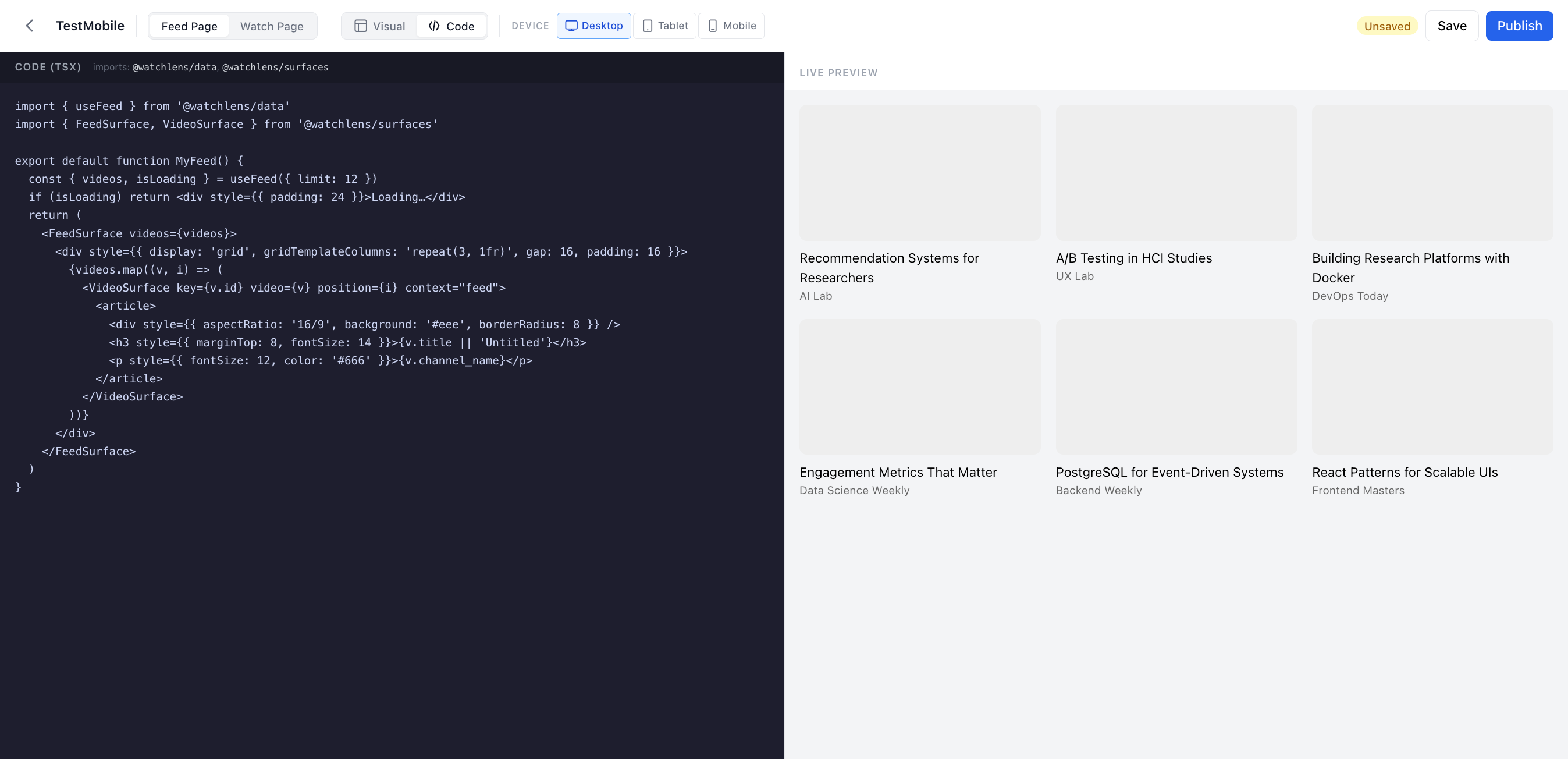
Two panes split the workspace.
- TSX source (left). A textarea editing
ui_templates.code_text. The default template demonstrates the shape the runtime expects (a default-exported React component that calls the data hooks and mounts surface primitives). - Live preview (right). The pasted TSX is compiled by sucrase on every keystroke (with a short debounce) and rendered against mock videos. Compile errors and render errors surface in a red panel instead of crashing the participant view.
Imports the runtime resolves
The compiler rewrites a small set of import specifiers to read from
the platform's runtime global on window.__watchlens__.
import { useFeed, useVideo, useRelated } from '@watchlens/data'
import { FeedSurface, WatchSurface, VideoSurface } from '@watchlens/surfaces'
import { BlockTreeRenderer } from '@watchlens/blocks'
import * as React from 'react'
Anything outside this list throws a compile-time error so a missing import is visible in the editor before it can affect a participant.
Mock data preview
<CompiledUI mock> wraps the compiled output in a MockDataProvider
during preview. Every data hook (useFeed, useVideo, useRelated,
useComments) short-circuits to bundled mock content. Production
renders mount the same component without the provider, so real
participants see real data.
When to use the Code Editor
Use it when the layout cannot be composed as a block tree. Common examples follow.
- An absolutely positioned overlay on top of the player.
- A custom carousel with snap scroll and intersection logic.
- A layout that needs
useState,useEffect, or another React hook beyond the bundled data hooks. - Integrations with a third-party library you are willing to ship as raw TSX in the database.
The Visual Editor's "Eject" button is the recommended starting
point. It copies the block tree's pretty-printed TSX into the Code
Editor and switches the template's template_type to 'code'. The
visual track is no longer the source of truth for that template, but
the saved tree stays in the database for reference.
Save and Publish
The toolbar matches the Visual Editor's. Save persists the source as
a draft, and Publish flips status='published' so the template
appears in the UI Config dropdown for matching-device user groups.
What does not change between tracks
Every UI track WatchLens supports renders through the same surfaces. The standardized event schema (33 events across 6 categories) fires identically whether the template was authored as a bundled preset, a visual block tree, or pasted TSX. The Code Editor is a different authoring path, not a different runtime.
Where to go next
- Admin Visual Editor. The block-tree track that the Eject button feeds into this page from.
- Authoring a UI. Read the overview that compares all three UI authoring tracks.
- Block Reference. Useful when
the pasted TSX renders a
BlockTreeRendererover a tree literal.